 Space Backup Manual
Space Relay and billing
Chapter 11 of 14 · Contents
Space Relay connects your company's computers and phones when they are at different places and cannot reach each other directly; it carries their already encrypted traffic, stores nothing and cannot read anything. This chapter explains when it is used, what it sees, its settings and status lines, what it costs and how to buy credit, and its wire protocol for integrators.
What Space Relay is#
Space Backup copies files between your own computers and drives. Inside one office the computers find each other on the local network (LAN) and talk directly. When a company has more than one place (two offices, a laptop at home, a phone on cellular), the computers at one place cannot see those at the other: home and office routers do not let a connection in from outside.
Space Relay is a small service run by Digital Sign Technologies at relay.spacebackup.net (TCP port 47900). Every Space Backup app keeps one tiny connection open to it. Through that connection:
- the computers of one company find each other at every place (the relay tells each computer which others of its company are online, and where);
- when two of them can connect directly, they do, and the relay is out of the way;
- when they cannot, the relay pipes their connection: it passes the bytes from one to the other, unread.
The relay never holds a file. It is not cloud storage: when a backup goes from the office to a laptop at home, it goes from one of your computers to another, and Space Relay only passes it along.
Note: Space Backup itself is free on your own network: any number of computers, drives, folders and backups. Only traffic that actually goes through the relay is counted, and each company gets 50 GB of it free every month. See Billing and prices.
For a short overview of where Space Relay fits, see Space Relay in short.
How a connection is made#
Every time one device needs another (a backup to a computer's drive, a restore, a phone browsing its photos), the app picks the way in this order and uses the first that works:
| Order | Way | When it is used | Through the relay? | Counted? |
|---|---|---|---|---|
| 1 | LAN | The other computer is seen on this network (its announcement arrives here). | No | No |
| 2 | Same site | The relay says the other computer has the same public IP address as this one (both behind one router, but the LAN announcement did not get through, e.g. different subnets), or one of the other computer's LAN addresses is on one of this device's own networks (the public addresses can differ on one LAN: IPv6 for one and IPv4 for the other, two lines out of one office, or the relay not having said yet). Its LAN addresses are tried, 1.5 seconds each. | No (the relay only told the addresses) | No |
| 3 | Relayed | Nothing above worked. The relay opens a pipe between the two. | Yes | Yes |
What the app remembers:
- A way that did not answer is skipped for 10 minutes for that device; the last way that worked is tried first next time, unless it was the relay: the relay is never tried before a LAN way.
- When this device's network changes (another Wi-Fi, a cable, a VPN), all of that is forgotten and the idle connections to other devices (the photos and albums the desktop window is reading) are closed, so the next request plans again from the start and takes the LAN where there is one now.
- A way that answered but turned out to be another computer (the security handshake failed, for example an old address now used by someone else) is avoided for 10 minutes too.
- A device seen on the LAN always keeps its LAN address; what the relay says never replaces it.
Whatever the way, the devices then run their own security handshake with the company key, and everything after it is encrypted end to end between them (see What the relay can and cannot see). The relay cannot tell a backup from a restore; it sees only bytes.
Note: Phones only connect out. A phone is never connected to: no computer tries to reach it, and the relay sets up no pipe towards it. The phone reaches a computer on the LAN when it is on the same network (it learns the computer's LAN addresses from the relay and tries them when both have the same public IP or the address is on one of the phone's own networks), otherwise through a relay pipe.
No direct connections from the internet#
A computer is never reachable directly from the internet. It asks the router for no port forwarding (no UPnP, no NAT-PMP) and tells the relay no public port. Other devices reach it in one of two ways only: on its own network (its LAN addresses, when they are on the same network), or through a relay pipe. Computers at other places always go through the relay. Older versions forwarded the peer port and announced it; the relay no longer passes that port on, so no device of any version dials a computer at its public address.
Which way each computer is reached#
The Destinations window only says, in plain words, when computers at other places cannot be reached. To see exactly how each paired computer is reached, use the CLI:
sbctl dest list           # Windows
spacebackup dest list     # Linux and macOS
spacebackup peers         # Linux and macOS: each peer with lan / relayed
Each peer shows LAN or relayed, and the round-trip time of the last handshake. stats shows the relayed bytes used.
Keeping relayed traffic low#
Relayed traffic is what costs money, so Space Backup avoids it where it can:
- Do the first full backup on the LAN. The first backup of a computer copies everything; later ones copy only changes. If a laptop will back up to an office computer from home, let it run its first backup while it is in the office.
- Send once, copy among the computers. A phone (and in future any source) sends a backup once, to one computer (LAN first, otherwise the one with the best relay speed), and that computer copies it to the other chosen computers itself, over the LAN where they share one. See Replication between computers.
- Every relayed byte counts twice: once in (from the sender to the relay) and once out (from the relay to the receiver). Backing up 10 GB from home to the office through the relay uses 20 GB of relay traffic.
Space Relay is on by default#
Every install connects to the relay automatically. There is nothing to type: no address, no token, no certificate. The computers of one company meet at the relay because they hold the same company key (the relay is told a one-way fingerprint of it, never the key; see Joining a group).
When the relay is on but not needed (all your computers are in one office), its connection only sends a tiny keepalive every 30 seconds and carries no data. Data goes through it only when no LAN way exists.
Upgrades: an install from before version 0.9 that had the relay off and no relay token is turned on once (off was the old default, not a choice). If you turned the relay off yourself, it stays off; upgrades never change your choice again.
Turning it on or off#
On Windows: tray icon → Settings… → Space Relay → Connect PCs at other sites through Space Relay.
On Linux: spacebackup-gui → Settings → Space Relay → the same checkbox.


From the command line (all computers):
sbctl settings set relay off          # Windows
spacebackup settings set relay off    # Linux and macOS
Turned off, this computer neither finds nor is found by computers at other places; computers on its own network keep working as before. Phones that are away from the office then cannot reach it either.
What the relay can and cannot see#
The relay is built so that a person running it (or someone who broke into it) learns as little as possible.
| The relay sees | The relay never sees |
|---|---|
| The public IP address each device connects from, and when | The company key or any data key |
Each device's name (its machine name, e.g. ANNA-PC), app version and a random instance id | File contents, file names, folder names |
| Each device's LAN addresses and forwarded port (so others can connect directly) | Which files are backed up or restored, or when a backup runs |
| The group id: a one-way HMAC of a key derived from the company key | Your company's name, members or emails |
| A sealed blob per computer (its LAN announcement, encrypted with the company key), passed on unread | What is inside the announcement (destinations, free space) |
| How many bytes each pipe carried, and how long it lasted | What is inside a pipe: the devices' own encrypted channel |
What it does with that:
- Inside every pipe the two devices run their normal handshake: each proves it knows the company key (an HMAC challenge-response over fresh random nonces and both names), then every frame is encrypted with AES-256-GCM under session keys derived from the company key and both nonces. The relay cannot read a pipe, change it unnoticed, or pretend to be one of your computers.
- Logs hold connections, byte counts and errors; never payload.
- Counting is per group and month (in + out); that is what billing uses.
See Security model for the whole picture, including what our account service sees.
Status lines#
Under the checkbox in Settings, one line says what the relay is doing. The same line is the read-only setting relay-status (settings get relay-) and relay.status in status --json.
| Line | Meaning | What to do |
|---|---|---|
| Connected · 1.2 GB relayed this month | Connected. The number is your whole company's relayed traffic this month (in + out, all its computers), in decimal GB (or MB below 0.1 GB). | Nothing. |
| Not needed: all PCs are on this network | Connected, no computer of your company is reachable only through the relay, and nothing was relayed this month. | Nothing: the relay stays connected so that a computer at another place can find this one. |
| Connecting… | Just started, or reconnecting. | Wait a few seconds. |
| Can't reach the relay (offline?) | No connection for 20 seconds or more: this computer is offline, or a firewall blocks outgoing TCP 47900. | Check the internet connection; allow outgoing TCP to relay. (see Firewall and ports). Computers on this network keep working. |
| Can't reach the relay: the relay's certificate is not valid: … | The TLS certificate was refused: not trusted, not issued for the relay's name, or not the pinned fingerprint. The line says which. | Usually a network that intercepts TLS (a company proxy or antivirus "HTTPS scanning"). Exempt relay. from it. If you set relay-address or relay-fingerprint yourself, check them. |
| The relay refused this PC: … | The relay refused the connection: a relay token that is unknown or revoked, a group blocked for abuse, or a limit (too many computers in one group, too many new groups from one IP address in a day). | Read the reason. For a token problem, clear or fix relay-token. Otherwise contact support@spacebackup.net. |
| Activation needed: this month's free relay traffic is used (PCs on the same network keep working) | Your company used its free 50 GB this month and has no prepaid credit left. The relay keeps the connection (other places still see this computer) but carries no data. | Buy credit: Activate Space Relay… (see How to buy credit). |
Other places it shows:
- Tray (Windows): the icon turns yellow, with one balloon, when the relay has been unreachable for 2 minutes, refused this computer, or needs activation. The tray texts are, for example, "Space Relay activation needed: this month's free relay traffic is used; PCs at other sites cannot be reached (PCs on the same network keep working)" and "Space Relay unreachable: …".
- Relay balance line under the status line (signed-in computers, when the account service sells relay credit):
Relay balance: Free this month: 3.. Read when Settings opens and by the account sync; also the read-only setting2 / 5 GB · Prepaid: 87 GB relay-balance. relay-activate-url(read-only setting): once activation is needed, the page that activates Space Relay for this company; otherwise empty.
Note: When activation is needed, nothing breaks silently: backups to computers on the same network keep running. Only the computers that can be reached through the relay alone wait. Their backups are not lost; they catch up once credit is bought.
Settings#
Settings shows one checkbox, the status line, the balance line and the buttons. Everything else is deliberately hidden: there is no Advanced section on any platform. The other settings exist as settings keys for IT people and test setups, with the same defaults everywhere. A value set from the CLI keeps working and is kept when someone saves the Settings window.
| Key | Values | Default | In the window? | What it does |
|---|---|---|---|---|
relay | on / off | on | Yes: Connect PCs at other sites through Space Relay | Use the relay. Setting it records it as your choice; upgrades never change it. |
relay-address | host:port (IPv6 as [addr]:port) | relay. | No | The relay to use. A config with the pre-0.8 default spacerigs.io:47900 is moved to the new name on start. |
relay-token | a token, - (read it from standard input), --file F, or none | not set | No | Only for pre-provisioned (enterprise) accounts; not needed by anyone else. Never printed: settings get shows only whether it is set. |
relay-fingerprint | SHA-256 hex (64 digits, with or without :) or none | none | No | none: the certificate is checked normally (trusted chain, valid for the name; the production relay has a Let's Encrypt certificate). A fingerprint pins a self-signed relay instead. |
relay-status | read-only | The status line | See Status lines. | |
relay-balance | read-only | The balance line | The company's relay credit in one line; empty when not signed in or not read yet. | |
relay-activate-url | read-only | The activation page once this month's free traffic is used; else empty. | ||
lan-discovery | yes / no | yes | No | Linux and macOS only, for tests: no finds peers only through the relay (restart to apply). |
Examples:
# Windows
sbctl settings get relay-status
sbctl settings set relay-address relay.spacebackup.net:47900
sbctl settings set relay-fingerprint none

# Linux and macOS
spacebackup settings get relay-balance
echo 'k_example_token' | spacebackup settings set relay-token -
spacebackup settings set relay-token none
Where they are kept: config.json (UseRelay, RelayUserChoice, RelayAddress, RelayFingerprint). The relay token is a secret and is kept apart: DPAPI-encrypted for the user on Windows, the file ~/ (mode 0600) on Linux, the login Keychain on macOS. It is never put into config.json or a diagnostic bundle.
The full list of settings keys is in Settings keys.
Billing and prices#
What is free and what is paid#
- Free: everything on your own networks. No account is needed to back up on a LAN.
- 50 GB free per company per month of relayed traffic (in + out, all the company's computers and phones together, and its guests' traffic to your computers). The month is the calendar month in UTC; the free allowance starts again on the 1st.
- Beyond that: prepaid packs. Credit never expires and is used only after the month's free 50 GB.
| Pack | Price (USD) | Per 100 GB | Lookup key (API) |
|---|---|---|---|
| 500 GB | $9 | $1.80 | sb_pack_500 |
| 2 TB | $25 | $1.25 | sb_pack_2000 |
| 5 TB | $49 | $0.98 | sb_pack_5000 |
How it is measured:
- Decimal units: 1 GB = 10^9 bytes, 1 TB = 10^12 bytes, exactly as the relay counts. The apps always show GB.
- In + out: a byte that goes from one of your computers through the relay to another counts twice, once arriving at the relay and once leaving it. Sending 1 GB through the relay uses 2 GB.
- Only the relayed payload is counted (the bytes in pipes), not the tiny keepalive of the control connection.
- Order: each month's relayed bytes come first from the free 50 GB, then from the prepaid balance.
- Unlimited months: Space Backup can give a company unlimited relay use for some whole months (ask us). In those months nothing is taken from the free 50 GB or the balance and the relay never stops; the traffic is still counted, and every app says so at the top:
Space Relay: unlimited until March 31, 2027 · 125 GB used this month. After the last month the free allowance and the balance apply again. - The relay reports usage every 10 seconds, so a company can go a little past its balance (at most about one report's worth of what was in flight). The balance can then show slightly below zero; the next purchase covers it.
Activation needed#
When the month's free 50 GB are used and there is no prepaid credit left, the company needs activation:
- The relay refuses to set up new relayed connections and closes running ones within 4 MB.
- The control connection stays: computers at other places still see each other, and connections on the same network keep working.
- Every signed-in app shows Activation needed: … and the button Activate Space Relay…; owners and admins get a Space Relay credit used up notification (see Notifications and history).
- Buying a pack lifts it within one relay report (about 10 seconds); the success page says "Space Relay connects your sites again within a minute."
At the 1st of the next month the free 50 GB are there again, so a company that never buys simply waits for the next month.
Note: A company is billed as a company only once one of its computers is signed in with an email (Settings → Account). A signed-in app links the company's relay group to the company on our account service. A group no signed-in app has linked yet still gets 5 GB free a month from the relay itself, but cannot buy credit until someone signs in.
Low credit and auto top-up#
- Low credit: when the balance drops below 10 % of the last pack bought (and auto top-up is off), owners and admins get a Space Relay credit is low notification.
- Auto top-up (optional): the same pack is bought again, automatically, when the balance drops below 10 % of it. Turn it on with the checkbox Buy this pack again automatically when the balance drops below 10 % on the buy screen, or on the admin page's Space Relay panel (owner or admin), where you can also choose a different pack. It needs a card saved by an earlier purchase.
- The top-up charges the saved card through Stripe without asking. When it succeeds, the credit is added at once and Stripe emails the receipt.
- When the card is declined or needs authentication, the purchase is marked failed, auto top-up is turned off, and the owner and admins get an email "Space Relay auto top-up failed for <company>" with the reason, the balance and a link to buy. When the balance is then used up, the company is back to "activation needed".
- If Stripe cannot be reached, the top-up is tried again (never charged twice) about every minute with the relay's reports, and given up after 20 hours.
How to buy credit#
Any active member of the company can buy. There are four ways in; all end on the same buy screen of your account page, then Stripe Checkout.
- From the app's Settings. Windows: tray → Open Space Backup → Settings → Space Relay → Buy relay credit… (shown when signed in and payments are available), or Activate Space Relay… (shown when activation is needed). Linux:
spacebackup-gui→ Settings → Space Relay, the same buttons. They open the browser on a single-use link, valid 15 minutes, that signs the browser in as this computer's email and shows the buy screen. No password, no second sign-in. - From the CLI:
sbctl relay buy --open            # Windows: prints the link and opens it
spacebackup relay buy             # Linux / macOS: prints the link alone on the first line
spacebackup relay activate --open # what Activate Space Relay… does
relay activategives the same single-use buy link when this computer is signed in; when it is not, it gives the relay's activation page instead (it asks you to sign in in the app first). Not signed in and no activation page: exit code 1. - On the web: sign in at https://spacebackup.net/account/ with your email, then open Space Relay credit (
https:/; the address/ spacebackup. net/ account/ relay https:/signs in and goes there)./ spacebackup. net/ account/ ?next= relay - The activation link the relay hands out when activation is needed (
https:/, for example/ spacebackup. net/ account/ relay/ activate?group= <group code> …?group=7KQ2-M9XD): signed in, it shows the buy screen; otherwise it explains how to sign in.
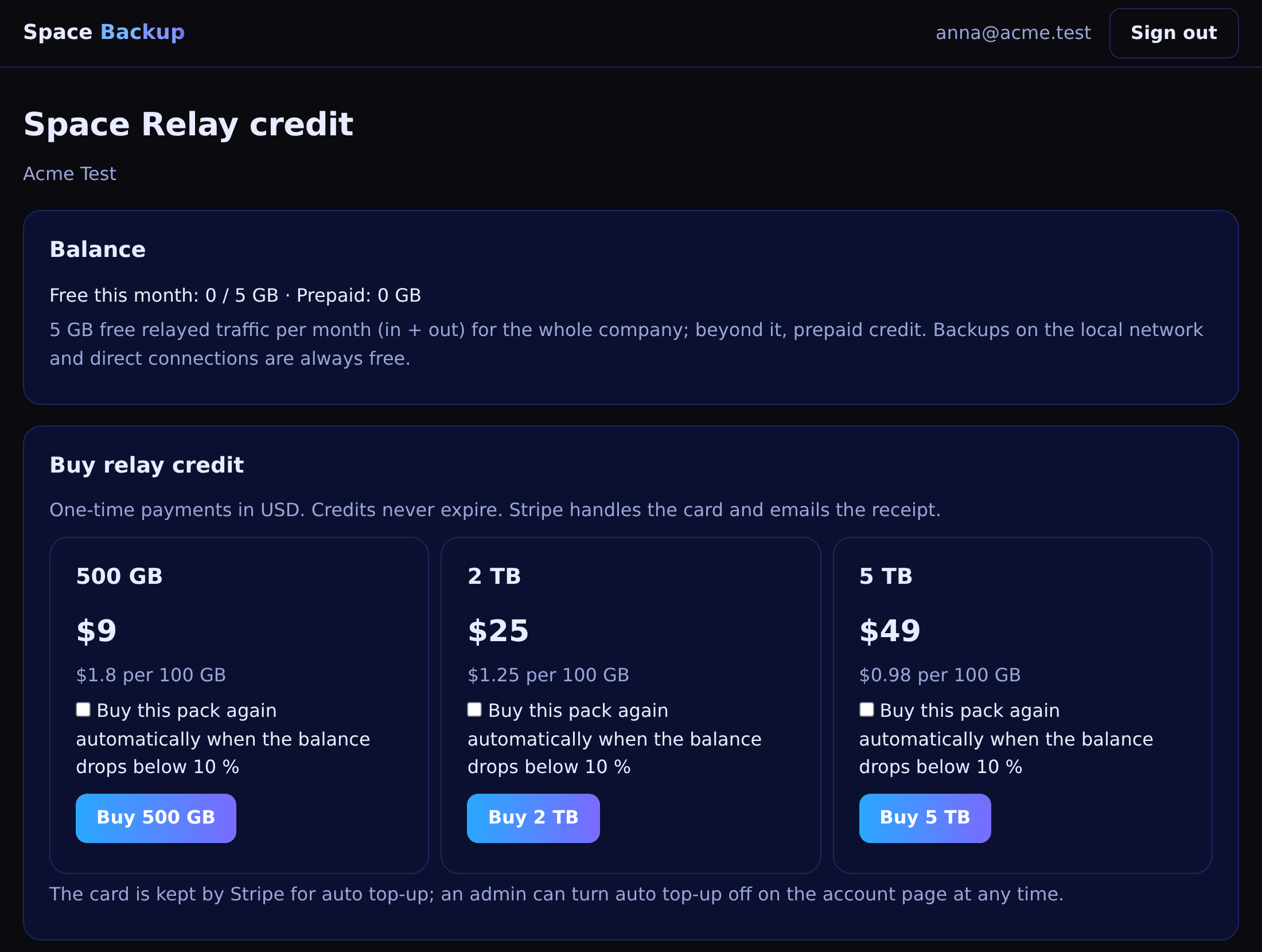
The buy screen shows the company's balance (Free this month: 3.), "activation needed" in red when it applies, whether auto top-up is on, and the three packs, each with its price per 100 GB, the auto top-up checkbox and a Buy button.
Paying:
- Click Buy 500 GB (or 2 TB, 5 TB). You go to Stripe Checkout, Stripe's own payment page. We never see your card number.
- Pay. Stripe sends the receipt to your email.
- You come back to Thank you: "500 GB was added to your relay credit." If Stripe is still confirming the payment, the page says so and the credit is added as soon as Stripe confirms it.
- Cancelling on Stripe's page brings you to Payment cancelled: nothing was charged.
The card is kept by Stripe for auto top-up only. An admin can turn auto top-up off on the admin page at any time.
Note: When payments are not set up on the service, the buy screen says "Payments are not set up yet. Please try again later." and the apps hide Buy relay credit….
Behind the scenes, each purchase is credited exactly once, whichever arrives first (Stripe's webhook, a retry of it, or your return to the Thank you page). A payment below the pack's price is not credited but held for review.
Checking the balance#
In the apps: the iPhone's and the Space Backup window's Settings › Space Relay show a bar of this month's free relay traffic left and, once it is used up, a bar of the prepaid credit left, with Buy relay credit… under them; once the free traffic is used up a small "Relay balance: 38 GB left" line is at the top of every screen, red when little is left (Space Relay balance). From the command line:
sbctl relay balanceFree this month: 3.2 / 5 GB · Prepaid: 87 GB
Auto top-up: on (500 GB pack)When activation is needed, a line Activation needed: … follows. With --json:
{
  "month": "2026-10",
  "freeBytes": 5000000000,
  "freeUsedBytes": 3200000000,
  "prepaidBytes": 87000000000,
  "activationNeeded": false,
  "autoTopUp": true,
  "autoTopUpPack": "sb_pack_500",
  "paymentsEnabled": true,
  "line": "Free this month: 3.2 / 5 GB · Prepaid: 87 GB"
}
freeBytes is null when the free allowance is unlimited (a beta setting). Not signed in: not signed in: sign in first: account signin <email>, exit code 1.
The admin page's Space Relay panel#
Owners and admins find a Space Relay panel on the company admin page (https://spacebackup.net/account/admin, section #relay):
- the balance line, and activation needed in red when it applies;
- Buy relay credit (opens the buy screen);
- Auto top-up: buy [pack] when the balance drops below 10 % with Save (needs a card from an earlier purchase; otherwise the panel says "Auto top-up uses the card of the latest purchase; buy a pack once to save one.");
- Usage per month: month, relayed (in + out), from the free allowance, from credit;
- Purchases: date, pack, amount, who bought it (or "auto top-up"), status (
paid,open,failed,cancelled,expired,review) with the error if any, and a Receipt link to Stripe's receipt.
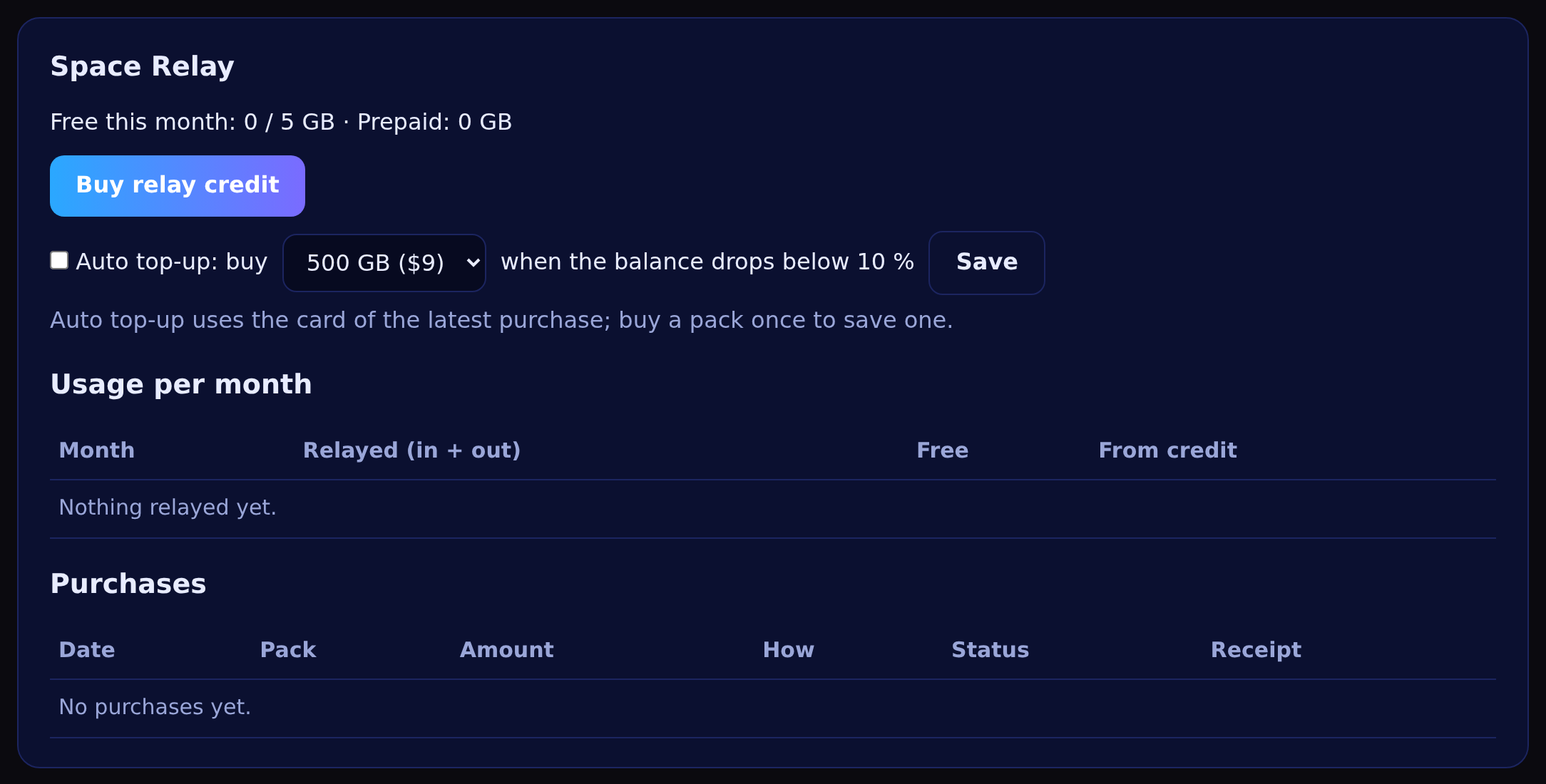
Plain members see their company's balance and the buy screen, and reach it from their own page (/account/me), but not the usage table, the purchases or the auto top-up setting. See The admin page.
Billing questions#
- Does a company with two offices pay twice? No. All of a company's computers share one free allowance and one balance, however many places and relay connections it has.
- Do guests' downloads count? Yes: when someone outside the company views an album shared with them, their traffic through the relay counts to the album owner's company (see Guests from outside the company).
- What happens to credit when the company key is rotated? Nothing. Rotation changes the relay group, and the apps link the new group to the same company automatically.
- Refunds, invoices, other currencies: write to support@spacebackup.net.
Relay protocol#
This section is for integrators who want to understand or reimplement the client side of Space Relay (the iPhone app is one such client). It describes protocol version 1 as the relay at relay. speaks it.
Connections, address and TLS#
- Address:
relay.spacebackup.net, TCP port 47900 (the name can move to another server; do not hard-code its IP address). No HTTP, no WebSocket: raw TCP with TLS. - TLS 1.2 or 1.3, server certificate only (no client certificates). The production relay has a publicly trusted Let's Encrypt certificate for
relay.spacebackup.net: validate it normally (trusted chain, name match). A relay run elsewhere may use a self-signed ECDSA P-256 certificate (made on its first start); clients then pin its SHA-256 fingerprint (of the DER certificate) instead of validating the chain. - Two kinds of connection, both TLS to the same port. The first frame decides which:
- a control connection (first frame
hello): one per device, kept open; peers, events, keepalive, requests for pipes; - a data connection (first frame
attach): one per pipe; afterattachedit carries raw bytes.
- a control connection (first frame
- The TLS handshake and the first frame must complete within 15 seconds, or the relay closes the connection.
Framing#
Every message is a frame: a 4-byte big-endian length, then that many bytes of UTF-8 JSON. The JSON is an object with a string field "t", the message type.
+----------------+-------------------------------------------+
| length (4, BE) | {"t":"ping","ref":"17"}  (UTF-8 JSON)      |
+----------------+-------------------------------------------+- A frame body is at most 64 KB (65,536 bytes). A length of 0, a negative length, or more than that closes the connection, as does a body that is not a JSON object with a string
"t". - Unknown fields must be ignored (fields are only ever added).
- On a data connection, after
attached, there are no more frames: what follows is the byte stream of the pipe.
Joining a group#
Devices of one company meet in a group. The group id is derived from the company key; the relay never learns the key, and a company's devices land in the same group because they hold the same key.
How the group id is computed (exactly as the apps do it):
master= PBKDF2-HMAC-SHA256(password = the company key text, trimmed, UTF-8; salt = UTF-8SpaceBackup company key v1; 200,000 iterations; 32 bytes).relayKey= HKDF-Expand(SHA-256, PRK =master, info = UTF-8relay, 32 bytes).group= lower-case hex of HMAC-SHA256(key =relayKey, message = UTF-8space-relay-group-v1): 64 hex digits.
The short group code shown to people and in the activation link is one-way too: the first 40 bits of SHA-256 of the ASCII lower-case group id, as 8 Crockford base-32 digits (0123456789ABCDEFGHJKMNPQRSTVWXYZ), written XXXX-XXXX. Typed codes are normalised: any case, O read as 0, I and L as 1, dashes and spaces ignored.
Who pays for a group:
- Open group (normal): a
hellowithout a token is billed to its group. A group the relay has never seen is registered on its firsthello, provided thehellocarries an app version and the source IP address has registered fewer than 20 new groups today (UTC). A signed-in app links the group to its company on the account service (POST /); from then on the company's free allowance and balance apply.account/ api/ relay/ group - Token account (pre-provisioned customers only): a
hellowithtokenis billed to that token. Groups are kept apart per token: a token's devices and an open group with the same group id never meet, and neither do two tokens. - Guest: a device outside the company, admitted with a guest pass to view an album (below). Billed to the group it joins.
When the company key is rotated, the group id changes; the apps link the new group to the company again by themselves.
Messages#
Directions: C = client (a device), R = relay. ref is any short string the client chooses; the relay echoes it in the answer.
| Type | Direction | Fields | Meaning |
|---|---|---|---|
hello | C → R, first frame of a control connection | group (64 hex), instanceId, machine, version, protocol (1), lanAddrs, blob?, token? | Join the group. |
hello (guest) | C → R | guest (relay pass), instanceId, machine, version, protocol | Join as a guest; no group or token. |
welcome | R → C | publicIp, keepalive (seconds), protocol, usedBytes, quotaBytes, and for open groups groupCode, activateUrl, activationNeeded | Accepted. publicIp is the address the relay sees for this device. |
peers | R → C, right after welcome | peers: [Peer] | The other devices of the group online now. |
peer-joined | R → C | peer: Peer | Another device joined. |
peer-updated | R → C | peer: Peer | Another device's addresses or announcement changed. |
peer-left | R → C | instanceId | Another device left. |
update | C → R | lanAddrs, blob? | This device's addresses or announcement changed. |
ping | C → R | ref | Keepalive. |
pong | R → C | ref, usedBytes, quotaBytes, and for open groups groupCode, activateUrl, activationNeeded | Keepalive answer with the current usage. |
relay-connect | C → R | to (the other device's instanceId), ref | Ask for a pipe. |
relay-session | R → C | ref, sessionId | The pipe is set up; attach to it. |
relay-incoming | R → C | sessionId, from (instance id) | Another device asked for a pipe to this one; attach to it. |
notice | R → C | code, message, and for activation also groupCode, activateUrl | Information: quota-warning, quota, activation. |
error | R → C | code, message, ref?, fatal? | A refusal (see Errors). |
attach | C → R, first frame of a data connection | sessionId, instanceId, token? | Join one side of a pipe. |
attached | R → C | Both sides are in; raw bytes from now on. |
Peer object:
{"instanceId": "5f1c0a9e2b7d4c31", "machine": "OFFICE-NAS", "version": "0.14.2",
 "publicIp": "198.51.100.7",
"lanAddrs": ["192.168.1.20:47800"], "online": true, "blob": "U0JBMd…"}publicIpis the address the relay sees the device connect from. No device is ever dialled at it: other sites go through the relay (No direct connections).blobis the device's LAN announcement sealed with the company key (SBA1| 12-byte nonce | AES-256-GCM ciphertext | 16-byte tag, base64): the very bytes it broadcasts on its LAN. The relay passes it on unread; a device of the same company opens it and learns the other's destinations and free space before connecting. Guests never receive it.
hello fields and their limits:
| Field | Rule |
|---|---|
group | 64 hex digits (any case; the relay lower-cases it). |
instanceId | 1 to 64 ASCII characters from ! to ~ (0x21–0x7E: no spaces, no control characters), unique per install. A second hello with the same instance id in the same group replaces the first connection (which gets error replaced). |
machine | The device's machine name, at most 64 characters. |
version | The app version. Required without a token (an empty version is refused); kept to its first 32 characters. |
lanAddrs | At most 16 strings ip:port, each at most 64 characters; others are dropped. |
publicPort | Sent by older versions (a port the router forwarded); ignored, never passed on. |
blob | Base64, at most 48 KB decoded; larger is dropped. |
token | Only for token accounts, at most 256 characters. |
A typical start of a control connection:
{"t":"hello","group":"3f9a…e1c4","instanceId":"5f1c0a9e2b7d4c31","machine":"ANNA-PC","version":"0.14.2","protocol":1,
 "lanAddrs":["192.168.1.34:47800"],"blob":"U0JBMd…"}
{"t":"welcome","publicIp":"203.0.113.24","keepalive":30,"protocol":1,"usedBytes":1200000000,"quotaBytes":5000000000,
"groupCode":"7KQ2-M9XD","activateUrl":"https://spacebackup.net/account/relay/activate?group=7KQ2-M9XD","activationNeeded":false}
{"t":"peers","peers":[{"instanceId":"a07d…","machine":"OFFICE-NAS","version":"0.14.2","publicIp":"198.51.100.7",
"lanAddrs":["192.168.1.20:47800"],"online":true,"blob":"U0JBMd…"}]}Updates. Send update whenever the LAN addresses, the forwarded port or the announcement change; the apps send it with every announcement (every 30 seconds), which also keeps them listed as online. The relay sends at most one peer-updated per device every 2 seconds (only the latest state of a burst).
Keepalive. Send ping every keepalive seconds (30, from welcome). A connection on which the relay hears nothing for 3 keepalives (at least 90 seconds) is closed; the apps likewise reconnect when they get no answer for 3 keepalives. Reconnect with back-off: the apps start at 1 second, double up to 60 seconds, add random jitter, and wait 5 minutes after an auth or revoked refusal. After a reconnect the new peers list replaces the old one.
A slow reader is dropped. The relay queues at most 32 frames for a device and gives each frame 20 seconds to be written; a device that does not read its control connection is disconnected (it reconnects and gets a fresh list).
Setting up a pipe#
- A (wants B) sends
relay-on its control connection.connect {to: <B's instanceId>, ref} - The relay answers A with
relay-and sends Bsession {ref, sessionId} relay-. The session id is 128 random bits (32 hex digits).incoming {sessionId, from: <A's instanceId>} - A and B each open a new TLS connection to the relay and send
attach {sessionId, instanceId}(plustokenfor a token account). - When both are in, each gets
attached, and the relay splices the two connections. Everything afterattachedis the byte stream between A and B. - Inside it, the two devices run the ordinary Space Backup peer protocol, starting with its handshake (A is the client). See Peer protocol and its frame format.
- When either side closes, the relay closes the other (there is no half-close).
Rules:
- Both sides must attach within 30 seconds of the session being made, or it is dropped (
timeout); the side that did attach gets "<machine> did not join the relay session in 30 s", naming the side that never came, and the relay logs "Relay session … not started in 30 s: … never joined". A computer waits 40 seconds for that answer. In a computer's log, "Relay: attaching to a connection from <instance> failed after 30.0 s: Vlads-iPhone did not join …" therefore means the phone asked for the pipe and then never opened its data connection (typically a phone changing between Wi-Fi and cellular), not a problem of the computer. - For an open group, the session id plus the instance id authorise the attach; both were only ever sent over the two devices' own control connections.
- The apps give the whole
relay-connectplusattach20 seconds before trying again. - No pipe is ever set up to a phone or a guest; a guest may open pipes only to the computers its pass names.
Uploads through the HTTPS door#
iPhones and iPads hand big files to iOS, which keeps uploading them while the app sleeps. It can only do so with a plain HTTPS request, so the relay has a door for it: PUT https:/. Each request carries one file for one computer. The relay stays a pipe: it stores nothing and cannot read the file, its name or where it goes.
- The request. The headers name the group (
X-SB-Group), the computer (X-SB-To, its instance id) and, for a token account, the token (X-SB-Token).X-SB-Envelopeis a small envelope sealed with a key derived from the company key ("SBU1"). Only the computer can open it, and it says which drive, date and path the file goes to, with its size and hashes (XXH128 and SHA-256).Content-Lengthis required. The body is the file as it lands on an encrypted drive, or, for a Not encrypted drive, the file sealed in 1 MiB AES-GCM chunks under a key of that one upload. - The relay checks the group, the computer and the limits as for a pipe (a token account's token, a blocked group, the quota or activation, at most 4 uploads to one computer at once). It then sends the computer
relay-, and the computer attaches as for a pipe. Afterincoming {sessionId, from, kind: "upload"} attached, the relay sendsupload {envelope, length, from}. - The computer opens the envelope and checks it. Then it answers
upload-go, and gets exactlylengthbody bytes, or it answersupload-at once, so a refusal moves no body byte. It writes the file into the device's own folder as a backup's file is written: a temp file, flushed and read back, both hashes checked, renamed, and recorded in the date's hash journal. Then it answersdone {status, error} upload-done. - The answer is an HTTP status and
{"status", "error"}:- 200
okoralready: the same file is in that date already, so a retry is always safe. - 409
closed: the date is finished or not marked. - 507
full - 400
bad - 403
denied - 402
activation/quota - 501
unsupported: an older computer. - 503
offline/busy/timeout, withRetry-After. - 500
error
- 200
- Billing. The body is metered and rate-capped exactly like a pipe's bytes.
- Who takes uploads. A computer's relay
hellosaysupload: 1when it takes uploads, and the others seeupload: 1in its peer entry.welcomesaysupload: 1when the relay's door is on. - Dead runs. A phone that marks a date with
mark {…, uploads: true}keeps it open for 24 hours after its last write instead of 2.
The full contract is docs/relay-upload.md in the source tree.
Devices' logs through the HTTPS door#
While Space Backup is being developed, devices send their own log lines to the relay so that a night's problems can be read on the server (the iPhone does today). PUT https:/ carries a piece of a device's log: UTF-8 lines, each starting with its UTC time, at most 2 MB.
- The request.
X-SB-Groupand, for a token account,X-SB-Token, as for uploads; without a token the group must be one the relay knows. A TV sends its relay guest pass instead (X-SB-Guest): the pass names the group.X-SB-InstanceandX-SB-Machinename the device,X-SB-Device(its account device id) andX-SB-Appare optional, andX-SB-Chunkis the piece's id: a piece sent again with the same id is kept once (200 already). - What the relay keeps. The lines, under
logs/, each under its own date, readable by root only. Control characters are escaped on write; nothing of a line is ever sent back. Caps: 50 MB per device and 500 MB per group a UTC day (<group code>/ <machine>/ <day>. log 413, withRetry-After), 5 GB in all (507 full). Not counted as relayed traffic. - Privacy. Log lines can name files and folders. So every day is deleted after 30 days, and
spacerelay set logs offturns the door off (it then answers404 off, andwelcomestops sayinglogs: 1). - Reading.
spacerelay logs <machine> [-on the relay server.- group <code>] [- - since <time>] [- - grep <text>] - Pipes name their devices. The relay's "Pipe … closed" lines name both ends (machine and instance).
The full description is docs/relay-logs.md in the source tree.
Limits#
| Limit | Value |
|---|---|
| Frame body | 64 KB |
Sealed announcement (blob) | 48 KB |
| LAN addresses per device | 16 |
| TLS handshake plus first frame | 15 s |
Attach after relay-session | 30 s for both sides |
| Idle control connection | closed after 3 keepalives without a frame (at least 90 s) |
| Queued frames per device | 32, 20 s per frame |
| Devices per open group at once | 200 |
| Connections per token at once | 200 |
| Guests per group at once | 50 |
| New open groups per source IP per day (UTC) | 20 |
| Pipes | 200 per account being set up (not yet attached); 10,000 in all on the relay, every pipe counted (being set up or attached and running) |
| Relayed rate | a total cap for the whole relay (300 Mbit/s by default), shared fairly between pipes in 64 KB turns |
| Usage limit check | every 4 MB per pipe direction |
Usage and its notices. welcome and every pong carry usedBytes (this month, in + out, the whole group or token) and quotaBytes (the limit, or null for none). At 80 % of a fixed limit (a token's quota, or an unlinked open group's free allowance) every device gets notice {code: "quota- once a month; for groups billed by the account service there is no percentage warning (the apps show the company's balance instead). At 100 % every device gets a notice with code activation (open groups, with groupCode and activateUrl) or quota (token accounts), new relay-connect requests are refused with the same code, and running pipes are closed within 4 MB. The control connection stays.
Errors#
An error frame carries code and a human-readable message.
- With
ref: the answer to that request (a refusedrelay-connect); the connection stays. - Without
refand with"fatal": false: information; the connection stays. - Without
refand withoutfatal: the relay closes the connection after it (a refusedhello, a revoked token, a replaced connection, a shutdown).
| Code | When | Example messages |
|---|---|---|
bad-request | A malformed or unexpected message. | "hello needs group (64 hex digits), instanceId and machine", "hello needs the app version", "expected hello or attach", "unknown message …", "that instance id is in use", "already attached" |
auth | Not allowed in, or not a party. | "invalid relay token", "this relay needs a relay token", "not a party of this relay session", "invalid guest pass", "guest pass expired", "no such relay group" |
revoked | The token was revoked (running connections are closed within 5 seconds). | "relay token revoked" |
blocked | The group was blocked by the relay's operator (abuse). | "this group is blocked by the relay" |
busy | A limit was reached. | "too many new relay groups from <ip> today", "at most 200 PCs per relay group", "the relay is busy (too many connections being set up)" |
offline | The other device is not connected, or the session is gone. | "that PC is not connected to the relay", "no such relay session (expired?)" |
timeout | The other side did not attach in time. | "{machine} did not join the relay session in {seconds} s" |
activation | An open group used its free allowance and has no credit (with groupCode, activateUrl). | "Space Relay activation needed: this month's free relay traffic and the prepaid relay credit are used" |
quota | A token account reached its monthly quota. | "relay quota reached" |
quota-warning | In a notice only: 80 % of a fixed limit. | "82 % of the free relay allowance used this month (4.10 of 5 GB)" |
replaced | The same instance id connected again; this connection is closed. | "the same PC connected again" |
shutdown | The relay is restarting; reconnect. | "the relay is restarting" |
Guests at the relay#
A device outside the company that was invited to an album (see Guests from outside the company) gets a relay pass from the account service (POST /, the relay value per company, valid one hour). It is opaque to the guest: gp1. + base64url(nonce 12 | ciphertext | tag 16), AES-256-GCM under a key derived (HKDF-SHA256, info space-) from a secret only the relay and the account service share. Inside is the UTF-8 JSON {"g": <group id, 64 hex>, "c": <company id>, "d": <the guest's device id>, "x": <expiry, Unix seconds>, "m": [<names of the computers the guest may reach>], "v": 1, "ExpiresAt": <x as an ISO 8601 date-; the guest never learns the group id. ExpiresAt is a computed copy of x that the account service's serializer writes too (about 40 bytes); the relay ignores it when it opens a pass and goes by x: the pass is expired from the second x on (x ≤ now).
The guest says hello {guest: <pass>, instanceId, machine, version, protocol}. The relay then:
- refuses (
auth) a pass that does not open, is longer than 8,192 characters, has expired, or names a group the relay has never registered; - lists for the guest only the computers its pass names, without their sealed announcements;
- never tells the company's devices about the guest; ignores its
update; - allows
relay-connectonly to those computers (offlinefor any other); - admits at most 50 guests per group at once (
busy); - when the pass expires, sends
error {code: "auth", message: "guest pass expired"}and closes the control connection (pipes already open run on; the computers check the guest's album ticket themselves).
Bytes in a guest's pipes count to the group, so to the album owner's company. Inside the pipe the guest and the computer run the guest channel (authenticated with both registered device keys), described in Peer protocol.
The relay and the account service#
The relay and the account service run on the same server. Billing works like this:
- Apps link their group. A signed-in app calls
POST /after sign-in and whenever its company key changes. Only a holder of the company key can know the group id, so knowing it is the proof. 409 when the group belongs to another company.account/ api/ relay/ group {"groupId": "<64 hex>"} - The relay reports. Every 10 seconds the relay sends
POST /to the service on the local machine: the bytes relayed per open group since its last report and the groups connected now. The report is signed: headeraccount/ internal/ relay/ report X-with a secret the two share. The service refuses a bad signature or one older than 5 minutes (401) and anything that came in through the public web server (404). Each report has an id and is applied once; the relay sends it again unchanged until it is answered, so no byte is billed twice.SpaceRelay- Signature: t= <unix seconds>,v1= <hex HMAC- SHA256(secret, "<t>. <body>")> - The service answers with each linked group's company, whether activation is needed, and the bytes it may still relay (the month's free GB left plus the balance). The relay decides from the last answer between reports.
- Groups no signed-in app has linked keep the relay's own free allowance (5 GB a month); the operator's manual activation of a group comes before billing.
The apps' relay routes on the account service:
| Route | Who | What |
|---|---|---|
POST / | device token of an active member | Link this device's relay group to its company. |
GET / | device token of an active member | month, freeBytes, freeUsedBytes, prepaidBytes, activationNeeded, autoTopUp, autoTopUpPack, paymentsEnabled, prepaidTotalBytes, lowBytes, packs ([{id, bytes, cents, currency, name}], the packs on sale). |
POST / | device token of an active member | {"url","expiresAt"}: a single-use link (15 minutes) that signs a browser in as this device's email and opens the buy screen. |
GET /account/relay | web session | The buy screen. |
POST / | web session, CSRF token | Starts Stripe Checkout for pack (and autoTopUp). |
GET /, GET / | browser | Stripe's return pages. |
GET / | browser | The relay's "activation needed" link. |
POST / | owner or admin, web session | Auto top-up on or off, and its pack. |
POST / | Stripe | Payment events, checked with Stripe's signature. |
Full request and answer formats, authentication and errors are in Account service API.